Is your car wash website due for a redesign? What to check first
Redesign when the site's structure is the problem: customers cannot find or use what they need on a phone, or you cannot keep it current. Wrong prices, a broken link or a slow photo are fixes, not reasons to rebuild.
A redesign is a bigger job than it looks from the outside. Pages move, links change, content has to be checked, and for a while the old site and the new one both need attention. It is worth it when the current site keeps getting in the way of customers or staff. It is not worth it because the colours look dated. This article helps you tell the two apart, then lists what to gather before any redesign starts.
Eight things to check on your current site
Go through these with your own phone. For each one, the table says how to check and whether it usually calls for a small fix or a larger redesign.
| Sign | How to check | Usually |
|---|---|---|
| Hard to use on a phone | With one thumb, find a location's hours, a wash price and the join button. | A redesign if the menu and layout are the problem. A fix if it is one page. |
| Outdated packages, prices or hours | Compare every package, price and hour on the site with your pay station. | A content fix. A redesign only if updating is so hard that it keeps happening. |
| Broken signup or location links | Tap every join button and directions link, on a phone, for every location. | A fix. |
| Slow or oversized photos and video | Run a free mobile speed test and look at the largest images and videos it lists. | Usually a fix: resize and compress. A redesign if the build itself is heavy. |
| Unclear ownership or update access | Write down who controls the domain, the hosting and the site's logins. | Sort out access first. Every other change depends on it. |
| Hard to keep several locations current | Count how many places you edit when one location's hours change. | A redesign if location details are scattered with no structure. |
| No measurement | Try to say how many people tapped call, directions or join last month. | A fix: add measurement. It does not need a new site. |
| The same customer questions, again and again | Ask your staff for the five questions they hear most. | A content fix, or a redesign if there is no sensible place to answer them. |
A small fix, or a redesign?
Most of the signs above start as small fixes. Fix them first: they cost less, they help customers sooner, and they show whether the rest of the site is really the problem.
A redesign is justified when the problems come from how the site is organised or built: when a fix in one place keeps breaking something in another, when there is nowhere sensible to put new information, when the phone layout cannot be repaired page by page, or when nobody can update the site without help each time. If several of those are true, patching can end up costing more than rebuilding.
Leaves them guessing
“The site looks old, so let's rebuild it.”
Answers the question
“Members can't find the join button on a phone, and changing one location's hours means editing four pages. Let's fix the structure.”
The second reason names problems a redesign solves and gives you something to check after launch.
What a redesign will and will not do
A redesign can make the site clearer, faster and easier to keep current. It does not by itself move you up in search results or bring in more members. Google says a good page experience does not guarantee a top ranking and that it still shows the most relevant content first. When pages move, Google also says to expect rankings to fluctuate for a while as it recrawls the site. Plan the launch for a quieter week, not the start of your busy season.
What changed on a real redesign
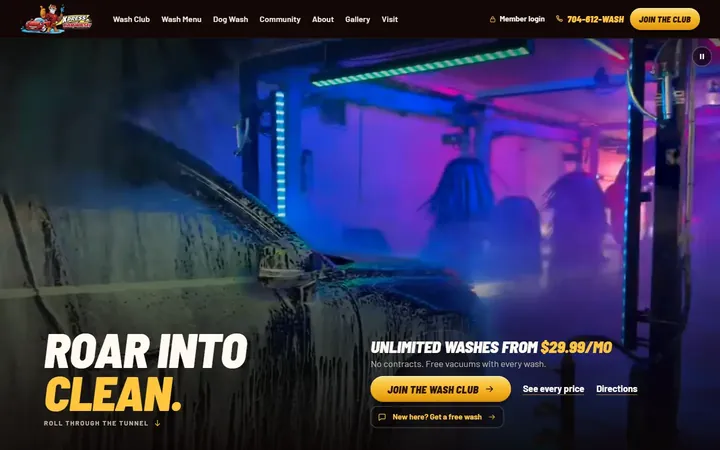
Tiger Xpress Carwash, an express tunnel wash in Mount Holly, NC, already had a website. The rebuild was not about the colours. It was about these:
- One main button on the first screen, Join the Wash Club, instead of two competing buttons.
- On a phone, a Join button that stays in the header, and the hours on the first screen.
- The washes side by side, named as on the pay station, each with a list of what it adds.
- The wash's own photos instead of clip art.
- The old page addresses redirected to the new pages.

Before the redesign starts
Domain and hosting
- You can log in to the domain registrar yourself
- You know where the site is hosted and who pays for it
- Email on your domain is listed, so a move does not break it
Existing pages
- A list of every current page address
- The pages people visit most, from your analytics
- Any address printed on signs, receipts or in ads
Content and images
- Text you want to keep, checked for accuracy
- Photos you own or have the right to use
- Logos and brand files in their original form
Analytics
- Admin access in your own name
- A note of what is measured today
- A copy of last year's figures, for comparison
Membership provider
- The signup link for each plan and location
- Who at the provider to call if a link changes
- Whether the provider can share completed signups
Plan the redirects
Every old page address should send visitors, and search engines, to the closest new page. Google's guidance is to map each old URL to its new URL before the move, use permanent redirects (a 301 or 308), and keep them for as long as possible, generally at least a year. Pay most attention to addresses people have saved or printed: the membership page, the locations page, anything on a sign or receipt.
Check it on launch day
- Open the old addresses from your list and confirm each one lands on the right new page.
- On a phone, tap every join button, for every plan and location, and confirm it reaches the right signup page.
- Compare every price, package name and opening hour with the pay station, one more time.
- Send a test message through each form and confirm it arrives.
- Confirm your analytics records the actions you chose to measure.
- Tap every phone number and directions link.
If you are planning a new site from the start rather than replacing one, what a car wash website should include is the place to begin.